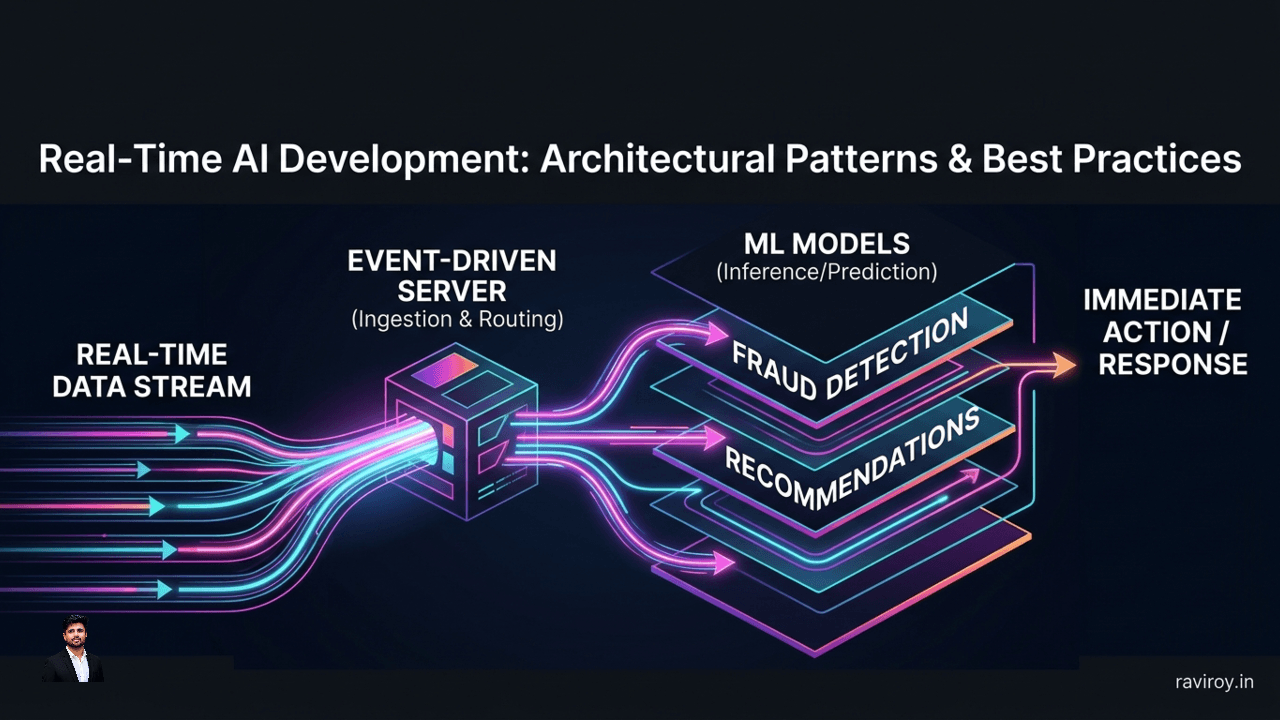
In today's hyper-connected world, instant gratification isn't just a luxury—it's an expectation. From personalized recommendations that update in milliseconds to fraud detection systems that flag suspicious transactions before they complete, the demand for immediate, intelligent responses has pushed the boundaries of traditional computing. This is the domain of real-time AI development, where the speed of insight directly impacts user experience, operational efficiency, and even safety.
Unlike batch processing, which handles data in scheduled, large chunks with inherent delays, real-time AI applications operate on a continuous stream, delivering predictions and actions with minimal latency. Think of a live chatbot offering immediate support, an autonomous vehicle making split-second decisions, or a personalized news feed adapting instantly to your scrolling behavior. The core challenges here are formidable: achieving ultra-low latency, maintaining high throughput, and ensuring unwavering reliability in the face of continuous data streams and dynamic user interactions. Successfully navigating these challenges requires a deliberate approach to architecture and engineering.
Core Architectural Patterns for Real-Time AI Development
Building real-time AI systems isn't just about faster models; it's about an entire ecosystem designed for speed. The foundation lies in choosing the right architectural patterns.
Event-Driven Architectures: The Backbone of Responsive AI
At the heart of many real-time AI systems lies an event-driven architecture. Instead of waiting for data to be pulled in batches, these systems react instantly to events—any significant change or action within the system.
Technologies like Apache Kafka or AWS Kinesis are critical here. They act as high-throughput, low-latency message brokers, allowing various components of your AI pipeline to communicate asynchronously. When a user interacts with an application, a sensor takes a reading, or a transaction occurs, an event is published to an event stream. Your AI inference service, or a data processing component, can then subscribe to this stream, immediately consume the event, trigger an inference, and publish its result as another event.
This pattern offers several benefits for real-time AI workloads:
Loose Coupling: Components are independent, making the system more resilient and easier to scale. One service doesn't need to know the specifics of another; it just reacts to events.
Scalability: Event streams can handle massive volumes of data, scaling horizontally to accommodate peak loads without choking the system.
Real-time Data Ingestion: Data is ingested and processed as it happens, enabling immediate inference triggers rather than waiting for batch windows.
Example:
User Action Event: A user adds an item to a cart on an e-commerce site. This generates a
AddToCartevent.Event Stream: The
AddToCartevent is published to a Kafka topic.Recommendation Service: A real-time recommendation AI service subscribes to this topic. Upon receiving the event, it immediately fetches user history, item details, and performs a rapid inference to suggest complementary products.
Display Event: The recommended products are published as a
RecommendationGeneratedevent, which the frontend service consumes to update the UI instantly.
Microservices vs. Serverless: Choosing Your Foundation
When deploying your AI models and related services, the choice between microservices and serverless architectures significantly impacts flexibility, operational overhead, and scalability.
Microservices involve breaking down an application into small, independent services, each running in its own process and communicating via APIs. This approach offers:
Fine-grained control: You have full control over the runtime environment, dependencies, and scaling strategies for each service.
Technology diversity: Different services can use different programming languages or frameworks, allowing teams to pick the best tool for the job.
Suitability for complex AI services: Ideal for stateful AI components, models requiring specific hardware (e.g., GPUs), or complex inference pipelines with multiple stages.
However, microservices introduce operational overhead in managing infrastructure, deployments, and inter-service communication.
Serverless architectures (e.g., AWS Lambda, Azure Functions, Google Cloud Functions) abstract away the underlying infrastructure. You only write and deploy code, and the cloud provider handles provisioning, scaling, and patching.
Cost-efficiency: You pay only for the compute time consumed, making it highly cost-effective for sporadic or event-driven AI workloads.
Auto-scaling: Functions automatically scale up and down based on demand, handling sudden traffic spikes gracefully.
Reduced operational overhead: Less infrastructure to manage, freeing up engineering teams to focus on AI logic.
Serverless isn't without its caveats. Cold starts (the delay when an inactive function is invoked for the first time) can introduce latency, which is a critical concern for real-time AI. Vendor lock-in and limitations on execution duration or memory can also be factors.
Choosing wisely: For AI workloads demanding consistent low latency and specialized hardware, or complex model serving with custom inference runtimes, microservices (often containerized with Docker/Kubernetes) might be preferred. For highly bursty, stateless inference tasks or pre/post-processing logic, serverless can offer compelling cost and scalability advantages, provided cold starts are managed (e.g., provisioned concurrency).
Hybrid Cloud-Edge Deployments: Balancing Latency and Scalability
Sometimes, even the fastest cloud-based AI system isn't fast enough. This is where hybrid cloud-edge deployments shine, bringing AI inference closer to the data source—at the "edge" of the network.
In this model, models are typically trained in the powerful, scalable environment of the cloud. However, for inference, a compressed or specialized version of the model is deployed to edge devices (e.g., IoT sensors, local servers, smartphones).
Advantages for real-time AI:
Reduced Network Latency: Inference happens locally, eliminating the round-trip latency to a distant cloud data center. This is crucial for applications where even a few milliseconds matter.
Enhanced Privacy and Security: Sensitive data can be processed locally without being transmitted to the cloud, addressing data sovereignty and privacy concerns.
Offline Capability: Edge devices can continue to perform AI tasks even without continuous cloud connectivity.
Distributed Processing: Distributing inference across many edge devices offloads the central cloud, improving overall system resilience and scalability.
Use Cases:
Autonomous Vehicles: Real-time object detection and path planning must happen in milliseconds on the vehicle itself.
Smart Factories/IoT: Predictive maintenance on industrial machinery, quality control, or anomaly detection happens locally to react instantly to issues.
Personalized Healthcare Devices: Monitoring patient vitals and alerting to anomalies without cloud dependency.
Engineering for Ultra-Low Latency in AI Applications
Achieving true real-time performance means meticulously engineering every stage of your AI pipeline to minimize delay.
Explicit Latency Budgeting Across the Pipeline
You can't optimize what you don't measure. Establishing a comprehensive latency budget is the first step. This involves breaking down the end-to-end user experience into discrete stages and assigning a target latency for each.
A typical real-time AI request lifecycle might look like this:
Client Network Latency: Time for the user's device to send the request to your system (e.g., 50ms).
Gateway/Load Balancer Queueing: Time spent waiting for an available service (e.g., 10ms).
Data Retrieval (RAG - Retrieval Augmented Generation): For LLMs, fetching relevant context from vector databases or knowledge bases (e.g., 20ms).
Model Inference: The actual computation time by your AI model (e.g., 50ms for a fast model, 200ms for a larger one).
Post-processing: Safety checks, tool calls, formatting, response generation (e.g., 10ms).
Backend Network & UI Rendering: Sending the response back to the client and rendering it (e.g., 20ms).
Example Budget: For a total target latency of 200ms, your budget might be:
Client Network: 30ms
Gateway/Queue: 5ms
Data Retrieval (RAG): 25ms
Model Inference: 80ms
Post-processing: 15ms
UI Rendering: 45ms
Total: 200ms
By explicitly setting these targets, you can identify bottlenecks, prioritize optimization efforts, and hold teams accountable for their component's performance.
Intelligent Routing and Model Right-Sizing
Not all AI requests are created equal, nor do they all require the most powerful—or slowest—model.
Intelligent Routing involves dynamically directing requests to the most appropriate AI model or service based on various factors:
Request Complexity: Simple queries might go to a lightweight, fast model, while complex, nuanced requests are routed to a more capable but slower model.
User Tier: Premium users might get priority access to lower-latency models or dedicated resources.
Current Load: Distributing requests across multiple instances or even geographically dispersed data centers to balance the load and minimize queue times.
Cost-Effectiveness: Routing to cheaper models when the desired quality can still be met.
Model Right-Sizing complements this by deploying a portfolio of models with varying accuracy-latency tradeoffs:
Smaller, Faster Models: Distilled models, quantized models, or smaller LLMs (e.g., specialized BERT variants, Llama-2-7B) can be deployed for routine tasks, high-volume queries, or as a first-pass filter.
Larger, More Accurate Models: Full-fidelity models (e.g., Llama-2-70B, GPT-4) are reserved for complex, high-value queries where accuracy is paramount, and a slightly higher latency is acceptable.
Implementation Example: A request comes in. A fast classification model (e.g., a few-shot LLM or a finely tuned BERT) first determines the intent. If it's a simple FAQ, it goes to a small, fine-tuned model. If it's a complex coding request, it's routed to a larger, more powerful model. This might involve an API Gateway or a custom routing service that inspects the incoming prompt or request metadata.
Caching, Memory, and Intermediate-Result Reuse
Recomputing the same thing repeatedly is a latency killer. Effective caching strategies are paramount for real-time AI.
Input Caching: The simplest form. If an identical request (or a semantically similar one, perhaps via embedding similarity search) has been processed recently, return the cached result immediately. This is particularly effective for popular queries or repeated actions.
Intermediate Result Caching: Many AI pipelines involve multiple stages. Caching the output of an early stage can prevent redundant computation.
Embeddings: If a document or query is embedded, cache its vector representation.
RAG Results: The top
kchunks retrieved from a vector database for a given query can be cached for a short period.Model Activations/Contexts: For sequential models or LLMs, caching previous layer activations or parts of the input context can significantly speed up subsequent inference steps.
Full Prediction Caching: Storing the final AI output for specific inputs. This is highly effective when responses are deterministic or change slowly.
In-memory stores like Redis or Memcached are ideal for these caching layers due to their blazing-fast read/write speeds. They can store key-value pairs, structured data, or even vector embeddings for quick lookups.
Efficient data structures and optimized serialization/deserialization processes also play a crucial role. For instance, storing intermediate embeddings as binary objects rather than JSON can reduce size and parsing time.
Optimizing Context and Enhancing User Experience
Even with lightning-fast models, a poorly managed user experience can negate all your optimization efforts.
Context Budgeting and Retrieval Narrowing for LLMs
Large Language Models (LLMs) operate within a "context window," a finite number of tokens they can process at once. Sending excessive, irrelevant context wastes compute, increases latency, and significantly inflates costs.
Techniques to manage and narrow context:
Summarization: Before feeding lengthy documents to an LLM, use a smaller, faster model or extractive summarization techniques to distill the core information. This significantly reduces the token count.
Selective Information Retrieval (RAG): Instead of dumping an entire knowledge base, use sophisticated retrieval methods (e.g., vector search with semantic understanding, hybrid search) to fetch only the most relevant chunks of information for a given query.
Prompt Engineering: Design prompts that guide the LLM to focus on specific aspects of the input and avoid hallucination or generating verbose, unnecessary text. Use few-shot examples to illustrate the desired output format and conciseness.
Conversation Memory Management: For conversational AI, don't send the entire chat history with every turn. Summarize previous turns, extract key entities, or use dynamic context windows that only include the most recent and salient interactions.
Example: Instead of passing a 100-page user manual to answer "how to reset password," first retrieve only the "password reset" section and potentially summarize it before passing it to the LLM.
Streaming-First UX: Time to First Token and Progressive Rendering
Perceived latency is often as important as actual latency. A streaming-first user experience (UX) can dramatically improve how users perceive speed.
Time to First Token (TTFT): This is the holy grail. The faster the first word or character of an AI response appears on the screen, the more "real-time" the experience feels.
How to achieve low TTFT:
Start model inference as early as possible in the request lifecycle.
Ensure your model serving infrastructure is optimized to flush initial tokens quickly.
Minimize any pre-processing or post-processing delays that happen before the first token is generated.
Progressive Rendering: As the AI model generates its response, don't wait for the entire output. Instead, stream the response back to the user incrementally.
Partial Updates: Displaying text word-by-word or sentence-by-sentence as it's generated.
UI Skeletons: Showing placeholders or loading animations until the actual content arrives.
Enable User Cancellation: For longer requests, allow users to "stop" the generation if they've received enough information or realize they've asked the wrong question. This provides control and prevents frustration.
This approach transforms a potentially slow, blocking interaction into a dynamic, responsive one, even if the total generation time remains the same.
Building Robust and Reliable Real-Time AI Systems
Speed without reliability is chaos. Real-time AI systems must be designed to withstand failures, high load, and unexpected inputs.
Reliability Patterns: Graceful Degradation and Shadow Mode
Real-time systems must operate under pressure and gracefully handle situations where optimal performance isn't possible.
Graceful Degradation: When systems are under extreme load, encountering failures, or external dependencies are slow, gracefully degrade functionality rather than crashing or returning errors.
Fallback Models: Use a simpler, faster, or pre-computed "default" model if the primary model is unavailable or overloaded.
Cached Responses: Serve stale but acceptable cached responses if real-time inference is failing.
Deterministic Logic: Fall back to rule-based or hardcoded logic for critical decisions.
Human-in-the-Loop: Route complex or failing requests to a human agent for review.
Feature Toggles: Temporarily disable non-critical AI features to preserve core functionality.
Shadow Deployment (or Shadow Mode): This powerful technique allows you to test new models, configurations, or even entire architectural changes safely in a production environment without impacting live users.
Mechanism: Incoming production traffic is duplicated and sent to both the existing (production) system and the new (shadow) system. The shadow system processes the requests, but its responses are discarded or logged for analysis, never sent back to the user.
Benefits: You can compare the performance, latency, error rates, and output quality of the new system against the old one using real-world data. This helps identify bugs, performance regressions, or unexpected model behaviors before a full rollout. It's an invaluable tool for ensuring stability during real-time AI development iterations.
Observability: Monitoring Real-Time AI Performance
If you can't see what's happening, you can't fix it. Comprehensive observability is non-negotiable for real-time AI. You need deep insights into every stage of your pipeline.
Key Metrics to Monitor:
Latency (p95/p99): Crucially, don't just track average latency. Focus on the 95th and 99th percentile latencies to understand the experience of your slowest users and identify outliers.
Time to First Token (TTFT): A critical UX metric for streaming AI applications.
Throughput: Requests per second, events processed per second.
Error Rates: HTTP errors, model inference errors, data retrieval failures.
Model Drift: Monitor model output quality and consistency over time to detect when a model is becoming stale or performing poorly on new data.
Token Usage/Cost: For LLMs, tracking input/output tokens to manage costs and identify inefficient prompt engineering.
Resource Utilization: CPU, GPU, memory, network I/O, disk I/O for inference services.
Queue Depth: How many requests are waiting to be processed at various stages. High queue depth indicates a bottleneck.
Tracing and Logging: Implement distributed tracing (e.g., OpenTelemetry, Jaeger, Zipkin) across your entire request lifecycle. This allows you to follow a single request from event ingestion through all microservices, data stores, model inferences, and post-processing steps, all the way to UI rendering. This is invaluable for pinpointing exactly where latency is introduced.
Granular Logging: Ensure detailed logs are captured at each stage, including input parameters, model versions, inference times, and output results. Use structured logging for easier analysis.
By combining robust metrics, tracing, and logging, you build a "control panel" that provides real-time visibility into the health and performance of your AI systems, enabling rapid detection and resolution of issues.
Conclusion
The journey of real-time AI development is a challenging but incredibly rewarding one. It demands more than just powerful algorithms; it requires a holistic approach encompassing thoughtful architectural patterns, meticulous latency management, optimized resource utilization, and robust reliability engineering. From leveraging event-driven systems and intelligent model routing to optimizing context for LLMs and delivering streaming-first user experiences, every decision contributes to the final perceived speed and utility of your AI application.
As AI continues to evolve, with agentic AI systems becoming more sophisticated and user expectations for instant, context-aware interactions ever increasing, the principles of ultra-low latency design will only grow in importance. Mastering these best practices today is key to building the next generation of intelligent, responsive applications that truly transform user experiences.
What's the biggest latency challenge you've faced in your AI development projects, and how did you tackle it?
💬 Join the conversation — share your take in the comments and tell us what you’d add.